Unlist an item
How to remove an item from the menu?

Written by Peppo
Published on 8/11/2020
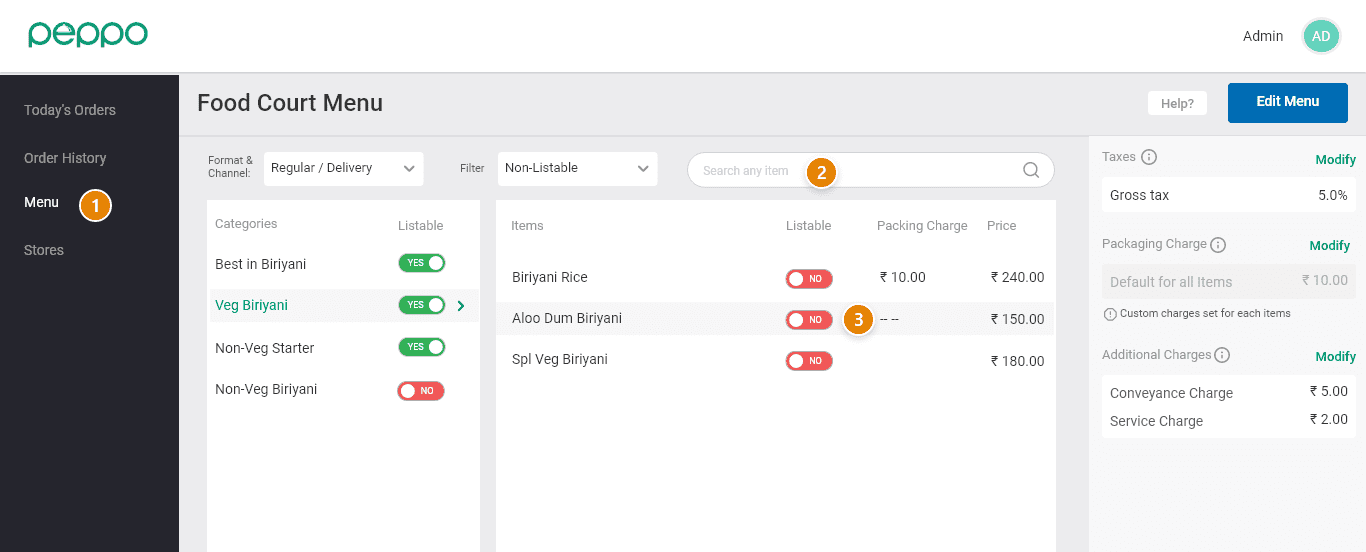
1 - Go to the ‘Menu’ tab on the left.
2 - Search for the item that you want to unlist.
3 - Change the toggle to ‘No’ of the item that has to be unlisted.
All Collections › Menu related changes › General › Unlist an item
How to remove an item from the menu?
1 - Go to the ‘Menu’ tab on the left.
2 - Search for the item that you want to unlist.
3 - Change the toggle to ‘No’ of the item that has to be unlisted.